
How I crashed my DJI drone

I crashed my beloved DJI Mavic Air 2 drone and it no longer flies, here is how
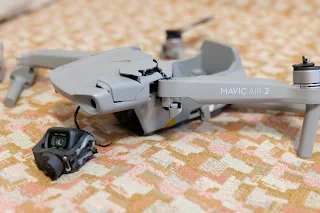
Mavic Air 2 after crash

About year and a half after I bought the DJI Mavic Air 2 drone I managed to crash it very badly and it is no longer operational. Yes, this might be a sad story but I am also thankful for all the amazing photos and videos I got from this amazing drone. 

It is really sad to see my Mavic Air 2 in such condition but even a tough bird like it couldn't manage the tough drop from over 20 meters into hard concrete.


How I crashed my Mavic Air 2

Well, it was supposed to be something positive - I decided to take some nice photos of the Christmas decoration in my hometown. And yes, as you can guess I wanted to do this in the evening so I can get nice shots of all the Christmas lights. 

broken Mavic Air 2 drone

Unfortunately, I never took the strong winds into consideration since my Mavic Air 2 was always very stable and predictable, even in bad weather conditions (it managed fine in strong wind, extreme sun or freezing temperatures and high humidity).  

DJI Mavic Air 2 battery crashed

But this time something went totally wrong and since it was quite dark I didn't see exactly what happened. My guess is that while flying very close to one of the skyscrapers the strong wind took the drone into the building and after crashing it lost balanced and dropped like a rock into the ground. 

damaged Mavic Air 2 drone

The hit on the ground was very bad and there was no chance the Mavic Air 2 would have remained in once piece. Still, almost all parts are present at home but I haven't consulted with DJI service if it can be fixed since I believe it is damaged vary badly and it would cost a fortune if fixable at all. 

In a typical DJI manner, the drone still starts and lights up so I managed to download the last photos I took with it from the internal memory. 

Here is the last image taken with my first drone:

the last image

I am not sure what I will do with it, sell it for spares or try to fix it... will give it some time and probably consult with DJI service provider.

For all the amazing moments captured, thank you Mavic Air 2!

Choppy videos and FPV from the DJI Mavic Air 2

Comments

Popular posts from this blog

Sony Bravia KDL-42W650A Full HD LED TV review

Sony Bravia KDL-42W650A Full HD LED TV price, specs and review Sony Bravia KDL-42W650A  Full HD LED TV Sony Bravia KDL-42W650A review - today at our consumer blog we are going to take a look at one of the latest 42-inch Sony Full HD TVs which offers great picture quality and will suit best everyone who needs an excellent home cinema experience without 3D effects. Sony Bravia KDL-42W650 is still not very popular around the world and the reason for that is not the lack of quality or functions which this TV is fully packed with but because of the fact that the  KDL-42W650/ KDL-42W650A is mostly going to be sold in Eastern Europe and some parts of Asia. Of course you can find this TV in other countries as well but it is still not presented in huge markets like UK and USA.

Lenovo ThinkPad E16 Gen 3 vs. Gen 2: The Key Upgrades Review

Why the ThinkPad E16 Gen 3 Is Worth the Upgrade The Lenovo ThinkPad E16 series is designed to be the "budget titan" of the business laptop world, offering the classic ThinkPad durability without the premium price tag. In this review, we compare the latest Gen 3 model against its predecessor, the Gen 2, to see if the upgrades justify the jump. While both are solid, the Gen 3 delivers crucial quality-of-life fixes that make it the far superior option.

Samsung Warning: Unplug charger immediately

How to solve the "Warning: Unplug charger immediately. We've detected moisture or foreign material in your charging/USB port" In case you've got the  Warning: Unplug charger immediately message on your Samsung smartphone but there is neither moisture or anything else in your phone port, well you are not the only one.  It seems that many consumes received this warning message on their phones without a reason. We are not sure what may have caused the issue on our case, noticed on the Galaxy Note 9 but there are some suggestion for quick fixes that we found online.