
Dell Precision 3520 laptop in 2022

Couple of years later I am still using the Dell Precision 3520 laptop - here is my 2022 opinion
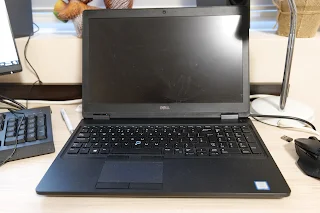
Dell Precision 3520 laptop in 2022

Even though the Dell Precision 3520 is far from the premium laptops in 2022 it still holding pretty well even by today's standards. I have been using this machine for couple of years now, mostly for work and browsing, no gaming whatsoever. 

Here is my personal feedback about the Dell Precision 3520 so far, what are its advantages and weak points compared to a modern 2022 laptop: 

Dell Precision 3520 - pros

One of the key advantages of this Precision laptop is that it is very well build and it looks and works perfectly fine. For used products that is essential as no matter how good the hardware specs are, if the computer is not in mint condition, nothing else would matter as much.

Dell Precision 3520 laptop in 2022 - video

Another positive thing in the Precision 3520 compared to 2022 laptops is the adequate hardware - 16GB of RAM, Core i7 (7th gen) processor and dedicated video card make this machine quite capable. 

I also like the keyboard of the Precision 3520 which is not only comfortable but feels like new.

2022 Dell Precision 3520 keyboard

The IPS display is still awesome, much better than some newer models. So is the battery which for a 5 year laptop still holds a decent charge for some 2 hours of work. 

Dell Precision 3520 - cons

If you consider this laptop for video and image editing there is one major drawback - the Intel HD Graphics 630 + NVIDIA Quadro M620 combo is not powerful enough for 4k editing or larger Full HD files. Yes, you can still do some work with it but please note that render times are very long and the laptop heats up quite a lot. 

Dell Precision 3520 - 2022 verdict

I like Dell Precision laptop series a lot and probably I will buy a newer model later when I need more powerful machine on the go. For now I can do my videography projects on a desktop PC and the Dell Precision 3520 is perfectly fine for casual work when travelling.

You can also check the portable Dell Latitude 5420 business laptop that we recently reviewed for the first time.

Dell Precision 3520 laptop in 2021

Comments

Popular posts from this blog

Sony Bravia KDL-42W650A Full HD LED TV review

Sony Bravia KDL-42W650A Full HD LED TV price, specs and review Sony Bravia KDL-42W650A  Full HD LED TV Sony Bravia KDL-42W650A review - today at our consumer blog we are going to take a look at one of the latest 42-inch Sony Full HD TVs which offers great picture quality and will suit best everyone who needs an excellent home cinema experience without 3D effects. Sony Bravia KDL-42W650 is still not very popular around the world and the reason for that is not the lack of quality or functions which this TV is fully packed with but because of the fact that the  KDL-42W650/ KDL-42W650A is mostly going to be sold in Eastern Europe and some parts of Asia. Of course you can find this TV in other countries as well but it is still not presented in huge markets like UK and USA.

Lenovo ThinkPad E16 Gen 3 vs. Gen 2: The Key Upgrades Review

Why the ThinkPad E16 Gen 3 Is Worth the Upgrade The Lenovo ThinkPad E16 series is designed to be the "budget titan" of the business laptop world, offering the classic ThinkPad durability without the premium price tag. In this review, we compare the latest Gen 3 model against its predecessor, the Gen 2, to see if the upgrades justify the jump. While both are solid, the Gen 3 delivers crucial quality-of-life fixes that make it the far superior option.

Samsung Warning: Unplug charger immediately

How to solve the "Warning: Unplug charger immediately. We've detected moisture or foreign material in your charging/USB port" In case you've got the  Warning: Unplug charger immediately message on your Samsung smartphone but there is neither moisture or anything else in your phone port, well you are not the only one.  It seems that many consumes received this warning message on their phones without a reason. We are not sure what may have caused the issue on our case, noticed on the Galaxy Note 9 but there are some suggestion for quick fixes that we found online.